The Platform

Model instead of code. Versioned, reviewed, released.

LAPS is an enterprise application platform: business applications are not custom-coded but configured — modeled, versioned and rolled out in a controlled way.

LAPS Designer Suite — model instead of code

The platform’s authoring environment. This is where you create:

  • Data models and validations
  • User interfaces (views, screens)
  • CRUD mappings and interfaces
  • Workflows and processes
  • Translations for all languages

Release management included — from draft to released configuration version.

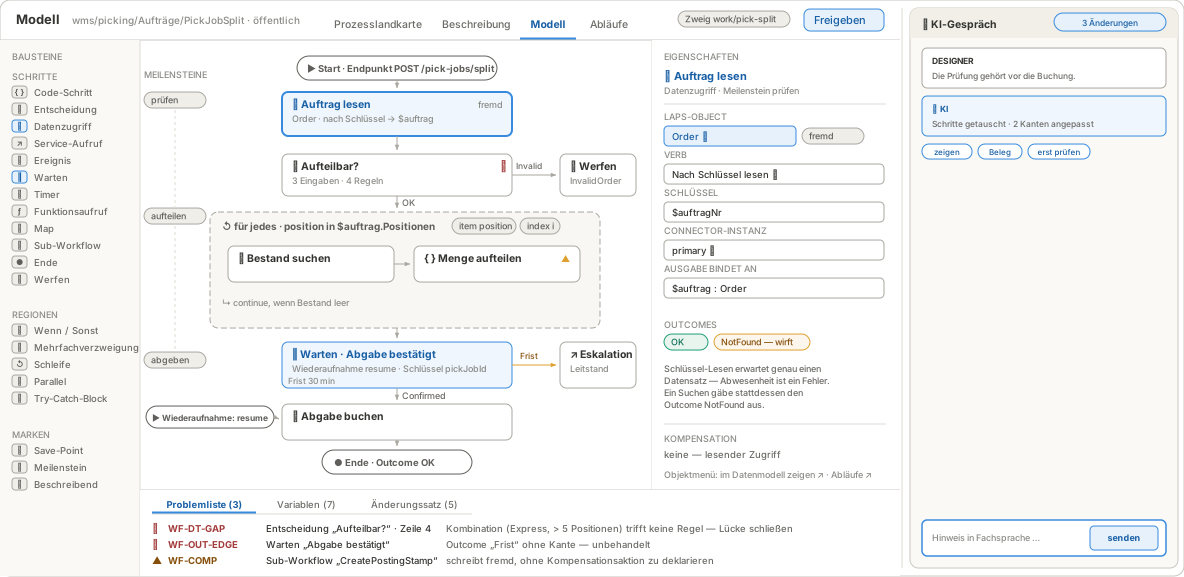
Workflow designer: process PickJobSplit with the block palette, a loop and a wait step, the data access properties on the right and the problem list below.
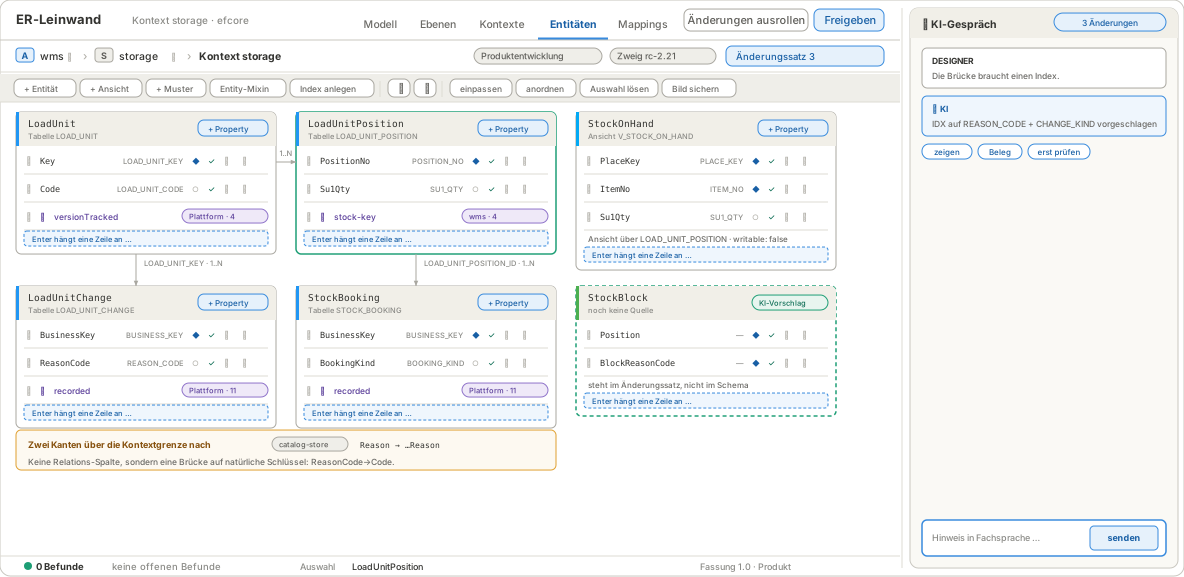
ER canvas in the storage context: entities LoadUnit, LoadUnitPosition, StockOnHand, LoadUnitChange and StockBooking with relations; an AI suggestion is outlined with a dashed line.
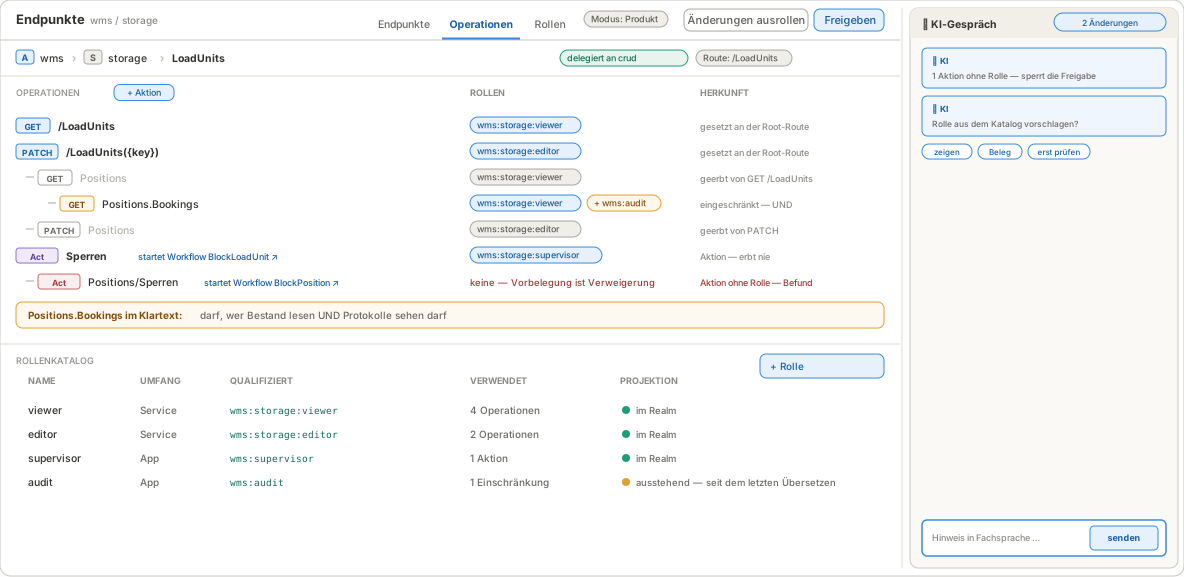
Endpoint LoadUnits: operations with their roles and origin, below the role catalog with projection into the realm.
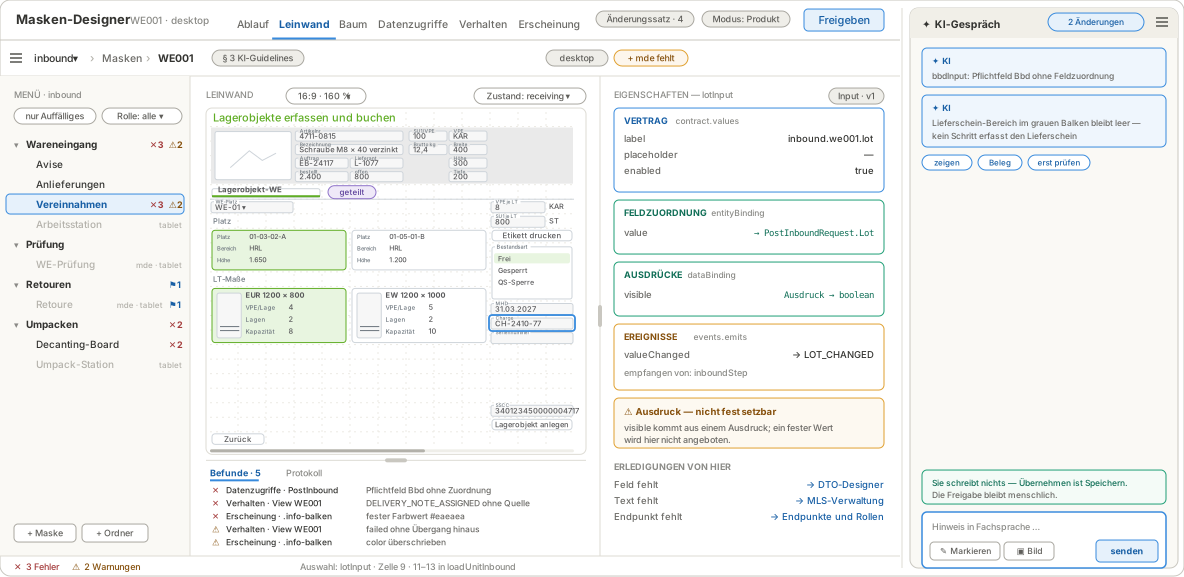
Screen designer: on the left the app menu tree with findings per entry, in the middle the goods receipt screen in its grid, on the right the properties of the selected input field.
  • Workflows — Processes built from blocks such as data access, decision, loop and wait — the problem list flags rule gaps and unhandled outcomes before release.
  • Entities — Tables and views on the ER canvas, relations even across context boundaries — every change goes into the change set, not straight into the schema.
  • Endpoints — Routes and operations with roles — set, inherited or restricted. An action without a role blocks the release.
  • Screens — Build screens on the canvas in the grid of the device class — field mapping, expressions and events in the properties panel, open findings right below the canvas.

LAPS Workbench — infrastructure under control

The management tool for the technical side:

  • Create and organize workspaces
  • Catalog of applications and services — what exists, in which version
  • Data sources and their bindings per environment
  • Instances per tenant and environment, isolated from each other

Administrators see and control what runs where, with which data.

The app shell — your users’ workplace

Sign in once, everything in one place:

  • Applications, dashboard, favorites and menus in one place
  • One sign-in for every application in the workspace
  • Light/dark theme, multilingual, translations maintainable in-house
  • Dedicated UI variants for desktop, tablet and handheld (MDE) devices

Applications are built as a team

Business and IT work on the same application — on the same objects, with shared tasks:

  • Discussion at the model — the question about a field, a screen or a workflow sits on the object itself
  • Tasks instead of shouts — “add field”, “review release”, with an owner or role
  • Draft, review, release — from change request to rolled-out version, traceable in one place
  • No tool break — no parallel world of tickets, spreadsheets and chats beside the configuration

Collaboration as a platform service

What applies to building applications applies to running them — which is why collaboration is a platform service, automatically available to every LAPS app:

  • Executable actions inside the task — the difference to chat and ticket systems: act instead of merely describe
  • Rule-based creation from system events, due dates derived from operational data, verified completion
  • Rendered to fit the device — reduced on the handheld, full at the workstation
  • Privacy by construction — no performance profiling, clear deletion rules, person reference only via the user account

Documenting processes — from the map to the single step

Documentation is written where configuration happens — and stays in one version with it:

  • Process map as the entry point — core and support processes in a business grid
  • Descriptive levels in BPMN 2.0 — with text, images, roles, screen and wiki links; import and export
  • Linked top-down to the executable model and the actual run
  • Product and project documentation in one place, multilingual, with a read mode for training

Workflow monitor — what actually happened

Every run lies on the model that ran:

  • Business case across all services — found by order, load unit or document
  • Path taken on the model, every iteration on its own, values with history
  • Against the version that ran — traceable even after later changes
  • Interventions only with a role and a reason — and in the log

Configuration under control

Versioned, reviewed, approved — no switch sprawl, but a traceable state:

  • Typed and validated — schemas check every change
  • Versioned with an audit trail — every change as a Git commit with author, timestamp and diff
  • Reviewed — approvals through review workflows
  • Controlled rollout — per application, environment and tenant

See for yourself.