Complete
Ready where warehouses are alike
Goods receipt, storage, replenishment, picking, loading, returns, stocktaking: the WMS foundation is in place — multi-site, multi-owner, multilingual.
Everything a warehouse needs
Multi-site, multi-owner, multilingual — operated from the control room as well as on handhelds and vehicle terminals.
Goods receipt & decanting
Receive fast, check properly.
Details
- Delivery notification down to pallet level — for notified goods, scanning the SSCC is enough
- Paper delivery note by photo — a handheld or smartphone is enough: the AI turns it into an electronic document, matched against the purchase order
- Quality and quantity checks — with warnings on over- and under-deliveries
- Master data completion in-process — missing warehouse data is enforced right away
- System-guided repacking (decanting) — e.g. from pallet to tote for the automated area
Warehouse & inventory
Chaotic and fixed-bin storage in parallel, with optimal slot selection.
Details
- Empty-slot search — by weight, dimensions, load carrier and zones — short travel, full space usage
- Batches and expiry dates — traceable across all processes, four batch-purity modes per zone
- Freely definable booking codes, stock types and blocks — from quarantine to multi-step release workflows
- Complete audit trail — always known who did what with which storage unit, and when
Replenishment & material flow
Modeled material flows instead of program code.
Details
- Flow strategies — any material flow modeled as chains of storage tiers
- Event-driven replenishment — stock targets in days of demand, maintained per tier and turnover class
- Urgent replenishment — prevents out-of-stock at the picking face
- Partial-quantity replenishment — exactly the required amount, minimal transports
- Post-peak optimization run — pre-filling, consolidating, relocating — as proposals for approval
Picking
The right system for every area.
Details
- Handheld terminals and electronic pick lists — as the preferred systems, printed lists as fallback
- Goods-to-person — at pick stations, plus fully automated picking
- Multi-customer, station, pick & pack, pre- and re-picking — the right mode per assortment
- Problem pool instead of standstill — LAPS detects unpickable lines in advance; rules resolve known cases on their own
Transport control
Urgent first, nothing left behind.
Details
- Forklift guidance system — with priorities that escalate over time
- The right vehicle — orders only go to equipment with matching lift height, load capacity and work zone
- Multi-stage, broken transports — across forklifts, conveyors and automated storage
- Collective transports — with several load carriers cut travel times
Goods issue & loading
More goods per truck, no carrier on the wrong one.
Details
- Consolidation — of complete load carriers — lower freight costs
- System-guided loading — no carrier on the wrong truck, none forgotten
- Repacking as a value added service — special packaging and labeling at the packing station
- Shipping documents and carrier labels — for UPS, TNT, FedEx and others, straight from the system
Returns
Inspected fast, available again fast.
Details
- Receipt with or without notice — return order from the ERP or created directly in LAPS; the camera at the returns station documents the condition
- Assessment per line — back to stock or rejected, with reasons you define yourself
- Acceptance with reservation — goods in unclear condition sit in stock, blocked; the decision becomes a task with photo and due date
- Available again, fast — putaway straight to the pick face or to a returns slot created automatically; picking takes returned stock first
- Supplier returns and scrapping — system-guided like a regular order; every line is reported back to the ERP with how it was handled
Stocktaking & special processes
Count less, know more.
Details
- Every stocktaking method — cut-off date online or by list, perpetual, zero-crossing, item and slot counts
- Tolerance limits — trigger recounts automatically, without the control room
- Cross-docking — passed through without intermediate storage
Planning & reporting
One time model for slot choice, capacity and staffing.
Details
- One set of time standards — calibrated from actual times — instead of five tables that contradict each other
- Capacity and staff planning — forklift hours and shift needs from tomorrow's order load
- Real-time warehouse cockpit — open lines, transports, performance, equipment and plant status on one screen
- Report designer in the interface — your own layouts, export to PDF, XLS, CSV and more
Open to your system landscape
One host contract, many connectors.
Details
- Canonical host contract — articles, orders, notifications and confirmations defined once; the connector translates to your ERP
- The transport channel is configuration — REST, messaging, files or exchange tables
- Master-data ownership sharable per field — articles from the ERP, warehouse data in LAPS
- Multiple owners and warehouses — in one system, with cross-site reporting
Short paths between control room and floor
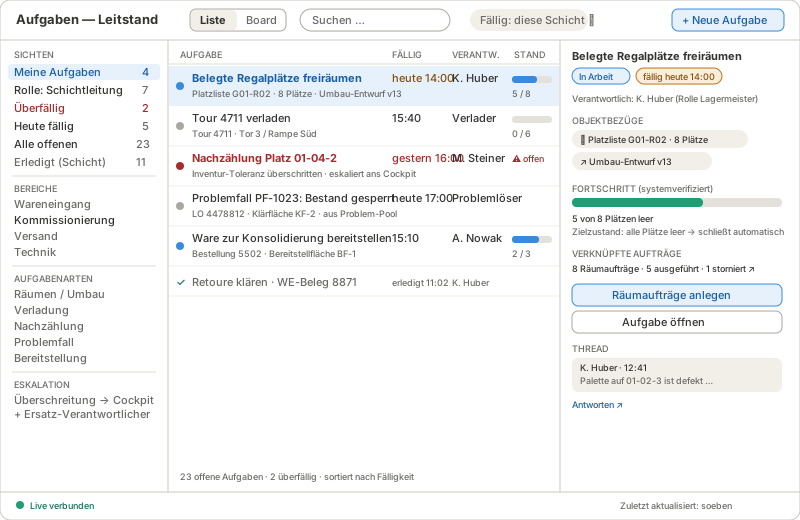
Warehouses are big, distances are long. What runs on calls, paper or the phone today becomes traceable: as a task with a due date, or as a message attached to the operation.
Tasks on slots, routes and orders
- Created automatically — route complete → “Load”, count discrepancy → “Recount”
- Due dates from the data — the loading task knows the route's departure time
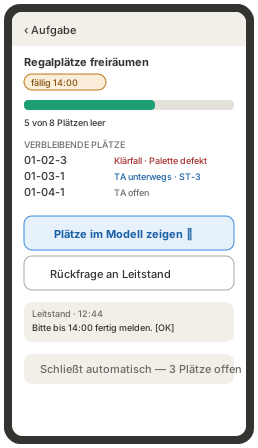
- Act with one tap — create clearing orders, start loading — straight from the task
- Reduced on the handheld — short list, large buttons, a question to the control room
- System-verified completion — done when all slots are empty — not when someone ticks a box
Messages attached to the operation
- Channels per area and shift — picking, maintenance, shipping — the role decides who reads along
- System messages with quick actions — conveyor fault → “Create task” straight from the message
- Questions where they belong — the thread about a route sits on the route, not in a global chat
- Context next to the message — affected element, open tasks, fault history
- No performance tracking — clear retention periods, personal reference only via the user account

The warehouse in 3D
Not a second CAD model, but a graphical view of the real WMS data: slots, stock, forklifts, conveyors and plant status — live and reachable from every menu.

Always up to date
The model shows the same data the WMS works with — nothing to maintain next to the system.
“Show in warehouse model”
From every menu: slot, stock, zone, forklift, order — and back again.
Plant status where it happens
Faults appear on the affected element, together with the orders they hit.
Replay and what-if
Play back yesterday's operation, rehearse the next peak in advance.
Processes that document themselves
From the process map down to the single step: documentation is part of the configuration — with text, images and links, in BPMN 2.0 and in your language.
- Process mapWhich processes exist and how they connect.
- DescriptionWhat a process does in business terms — BPMN, text, images, roles.
- ModelThe flow the system executes.
- RunWhat actually happened in a single case.
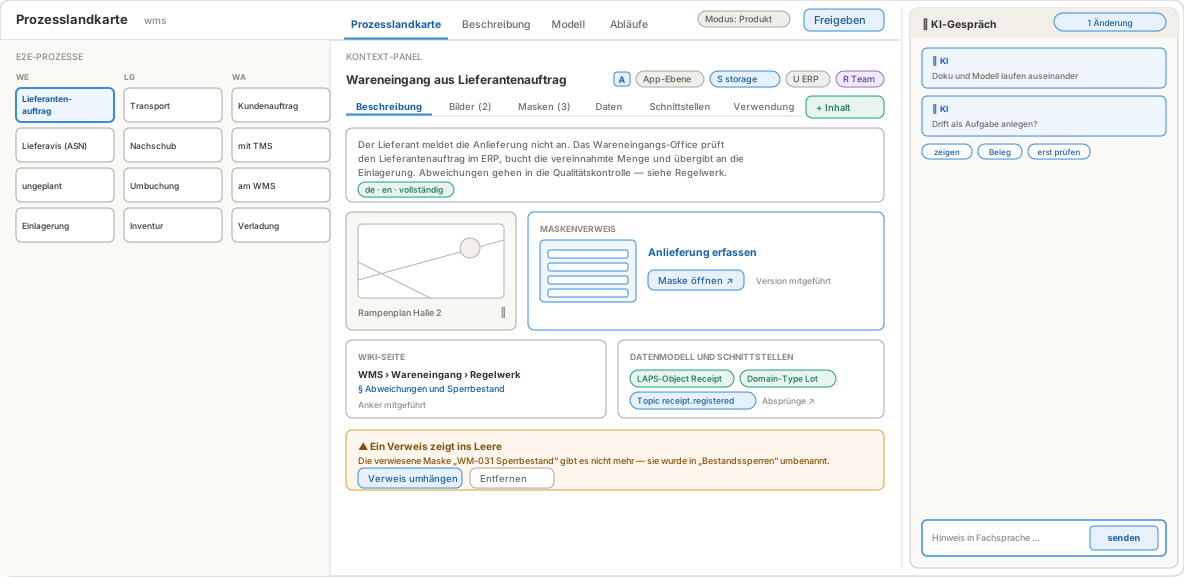
The process map carries the documentation
- Every process an entry point — goods receipt, storage, goods issue — core and support processes in a business grid
- Enriched with text and images — description, dock plan, label samples — embedded, not hidden as attachments
- Linked both ways — from the documentation into the screen, and from the screen to the right place in the documentation
- No dead links — a renamed screen shows up as a finding, with a proposed fix
Description in BPMN 2.0
- The language of process experts — pools for services and external systems, lanes for roles — readable without training
- Top-down to the single step — every activity leads one level deeper, down to the executable model and the actual run
- Product and project documentation — what the standard does and what was adapted for your warehouse — in the same place
- Versioned with the configuration — documentation and process go live in one commit; the description always matches the running version
- Import, export, training — BPMN exchange with external tools; the read mode doubles as training material
